
Why Does Web Design Matter?
Your website is often the first place potential customers learn about your business. If it looks outdated, loads slowly, or makes information difficult to find, visitors may leave without exploring your services.
Understanding what web design is helps businesses create websites that look professional, communicate value, and guide visitors toward meaningful actions.
Web design is not just about choosing attractive colors or adding images. It combines visual appearance, navigation, usability, accessibility, and responsive layouts to create a better experience for visitors.
What Is Web Design?
Web design is the process of planning and creating a website’s layout, visual appearance, structure, and user experience. It includes colors, typography, images, navigation, page organization, and interactive elements.
The goal is to make a website attractive, easy to use, and aligned with business objectives.
For example, a service-based business may need clear service pages, customer testimonials, and a contact form. An online store may require product categories, product images, filters, and a simple checkout process.
In simple terms, good web design helps visitors understand your business, find relevant information, and take the next step.
Why Is Web Design Important for Businesses?
1. Creates a Professional First Impression
A consistent layout, readable typography, and relevant images help communicate credibility. A cluttered or outdated website can make it harder for visitors to understand your business and its offerings.
2. Improves Navigation
Visitors should be able to find services, product details, and contact information without unnecessary effort. Clear menus, descriptive headings, and organized pages make browsing easier.
3. Supports Conversions
An effective website guides visitors toward actions such as requesting a quote, booking a consultation, or purchasing a product.
Clear calls to action, such as “Contact Us” or “Request a Quote,” help visitors understand what to do next.
4. Improves Mobile Usability
Responsive web design allows a website’s layout to adapt to different screen sizes. Readable text, easy-to-tap buttons, and mobile-friendly navigation help visitors use the website on smartphones and tablets.
5. Supports SEO and Performance
Organized content, logical navigation, and mobile usability contribute to a better website experience. Loading speed and visual stability also matter.
Google’s Core Web Vitals documentation explains how to assess loading performance, responsiveness, and visual stability.
Design alone cannot guarantee higher search rankings, but usability and performance should be considered throughout the design process.
What Are the Main Elements of Web Design?
Effective web design combines several elements to create a consistent and useful website.
| Element | Purpose |
| Layout | Organizes content and creates a clear visual hierarchy |
| Colors | Supports brand identity and consistency |
| Typography | Makes content readable and highlights important information |
| Images and graphics | Communicates ideas and supports the brand message |
| Navigation | Helps visitors find relevant pages |
| User interface (UI) | Makes buttons, menus, and forms understandable |
| User experience (UX) | Helps visitors complete tasks more easily |
| Responsive design | Adapts layouts to different screen sizes |
| Accessibility | Helps more people use the website effectively |
Visual Design and Readability
A well-designed website makes important information easy to notice. Clear headings, appropriate spacing, consistent fonts, and a focused color palette help visitors scan content quickly.
Avoid using too many fonts, excessive animations, or competing colors that distract from the main message.
Accessibility Matters
Accessible design considers visitors with different abilities. Useful practices include maintaining sufficient text contrast, using descriptive link labels, and ensuring interactive elements can be navigated using a keyboard.
The W3C Web Accessibility Initiative’s design tips provide practical guidance for improving website accessibility.
What Are the Different Types of Web Design?
The right approach depends on your website’s purpose, audience, and technical requirements.
| Type | Description | Common Use |
| Responsive design | Adapts layouts to available screen space | Business websites and online stores |
| Adaptive design | Uses predefined layouts for selected screen sizes | Projects with specific device requirements |
| Static website design | Displays content that remains largely consistent until manually updated | Simple informational websites |
| Dynamic website design | Displays content that can change based on data or user interaction | Portals and membership websites |
| eCommerce design | Organizes products, shopping carts, and checkout journeys | Online stores |
These approaches can overlap. For example, an online store can use responsive design and dynamically managed product information.
Choose an approach based on your audience’s needs and your business goals.
What Is the Web Design Process?
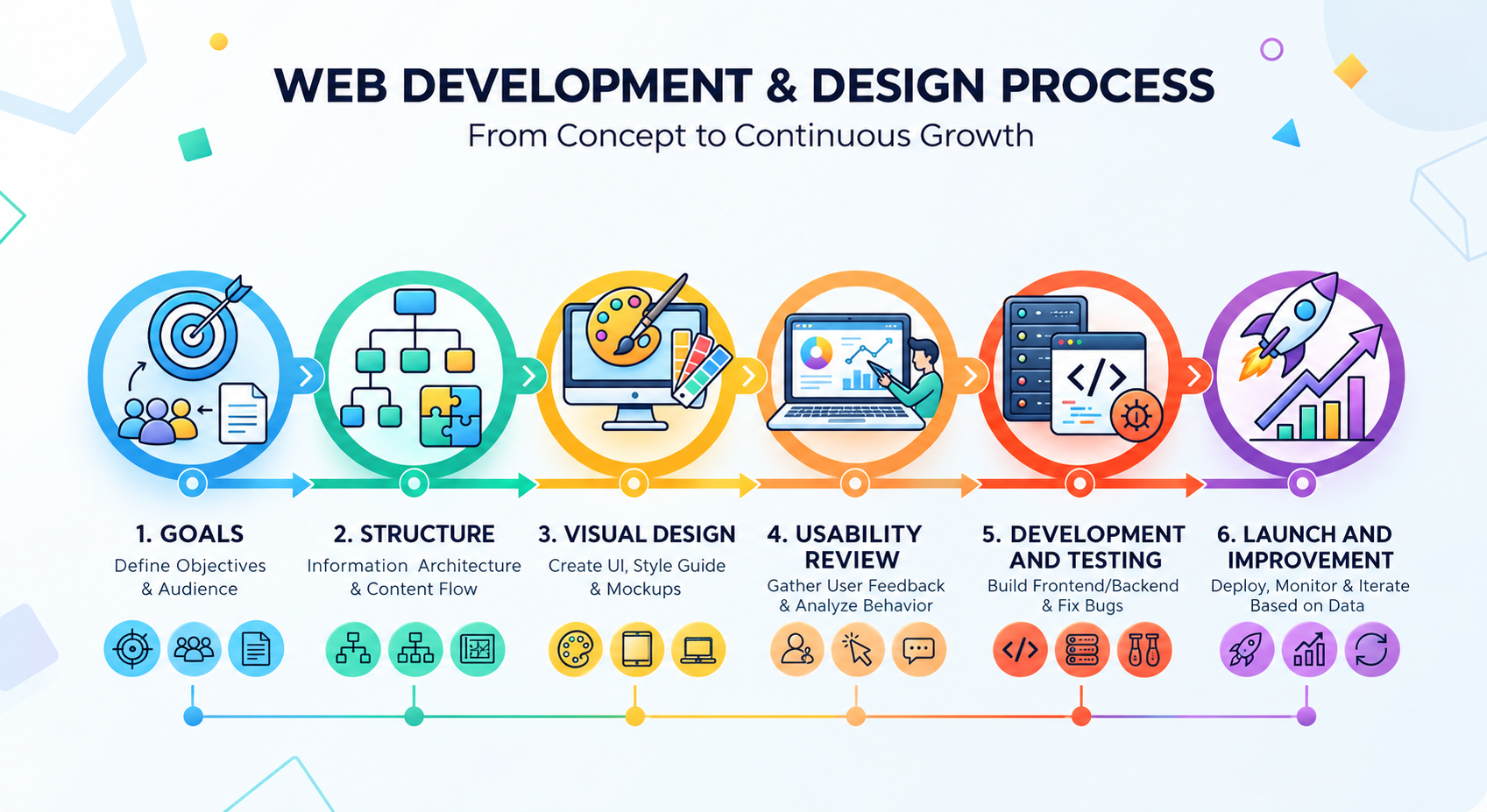
A structured process helps businesses create websites that are useful, consistent, and aligned with their objectives.
Step 1: Define Your Goals
Identify what your website should achieve, such as generating leads, explaining services, selling products, or providing customer support. Understanding your audience helps determine what information visitors need and which actions matter most.
Step 2: Plan the Website Structure
Organize pages into a logical structure, such as Home, About, Services, Portfolio, Blog, and Contact.
Create a sitemap and wireframes to plan the placement of headings, text, images, and calls to action before finalizing the visual design.
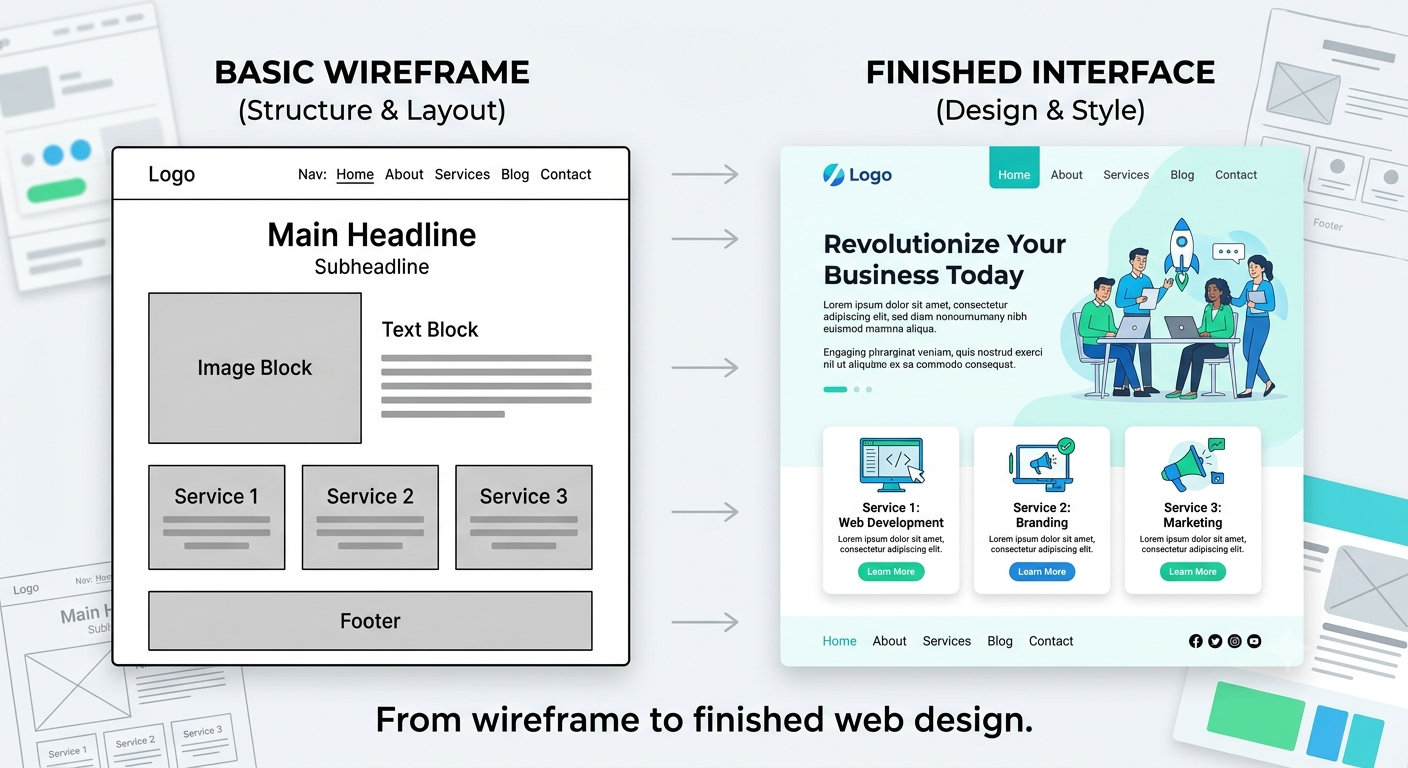
Step 3: Create the Visual Design
Select colors, fonts, imagery, and spacing that reflect your brand. Keep design elements consistent across pages so visitors can recognize your brand and navigate comfortably.
Step 4: Review Usability and Mobile Design
Check that the website works on mobile, tablet, and desktop screens. Review navigation, text readability, button sizes, accessibility, and the clarity of calls to action.
Step 5: Develop and Test
Web designers plan the visual experience, while developers implement the design and functionality.
Test important features such as forms, navigation, links, and checkout processes where relevant. Review performance and use Google’s Core Web Vitals guidance to identify possible user experience issues.
Step 6: Launch and Improve
After launch, review user feedback, website analytics, and conversion data. Use these insights to improve content, navigation, performance, and calls to action.
What Is the Difference Between Web Design and Web Development?
Web design and web development work together, but they have different responsibilities.
| Web Design | Web Development |
| Focuses on appearance, layout, and user experience | Focuses on technical implementation and functionality |
| Defines colors, typography, navigation, and page structure | Builds interactive features, integrations, and page components |
| Uses wireframes, mockups, and prototypes | Uses programming languages, frameworks, and other technologies |
For example, a designer may create a contact form’s appearance, while a developer ensures that the form submits information correctly.
Both disciplines are important for creating a website that looks professional and works reliably.
Common Web Design Mistakes to Avoid
Even an attractive website can create problems when usability is overlooked. Avoid these common mistakes:
- Cluttered layouts: Too many competing elements make information harder to scan.
- Confusing navigation: Unclear menu labels make pages difficult to find.
- Poor mobile usability: Small buttons and overflowing content frustrate mobile visitors.
- Weak calls to action: Visitors may not know what step to take next.
- Unreadable text: Small fonts and insufficient contrast reduce readability.
- Unoptimized images: Large media files can contribute to slow loading.
- Ignoring accessibility: Some visitors may struggle to navigate or understand the website.
- Neglecting updates: Outdated content and broken links can damage the user experience.
Quick Website Design Checklist
Use this checklist to review your website:
- The homepage clearly explains what the business offers.
- Navigation is simple and consistent.
- Services and products are easy to find.
- Text is readable and well organized.
- The website works across different screen sizes.
- Calls to action clearly explain the next step.
- Contact forms and important features work correctly.
- Images are relevant and optimized.
- Accessibility and website performance have been reviewed.
- Internal links lead to the correct pages.
Use the results to prioritize improvements based on visitor needs and business goals.
Frequently Asked Questions About Web Design
What is web design in simple words?
Web design is the process of planning how a website looks, organizes information, and helps visitors interact with its content.
Does web design require coding?
Not always. Designers can create layouts and prototypes without writing production code. Building a functional website may require developers, website builders, content management systems, or a combination of these options.
Does web design affect SEO?
Yes. Mobile usability, clear content structure, navigation, and website performance can support SEO. However, design alone does not guarantee higher rankings.
What makes a web design effective?
An effective website communicates value clearly, organizes information logically, works across devices, considers accessibility, and makes the next step easy to understand.
Conclusion: Build a Website That Supports Your Business Goals
Understanding what web design is helps businesses focus on more than appearance. Clear messaging, thoughtful layouts, intuitive navigation, responsive behavior, and performance-conscious design can improve the visitor experience.
By understanding your audience and following a structured design process, you can create a website that communicates your value and supports your business objectives.
Ready to elevate your online presence? Partner with Amron Softech to build a modern, user-focused website tailored to your business needs. Explore Our Services and take the next step toward a better website experience.